If you wish to unlink your Alpaca brokerage account from Monflex, you can disconnect it at any time directly through your settings.
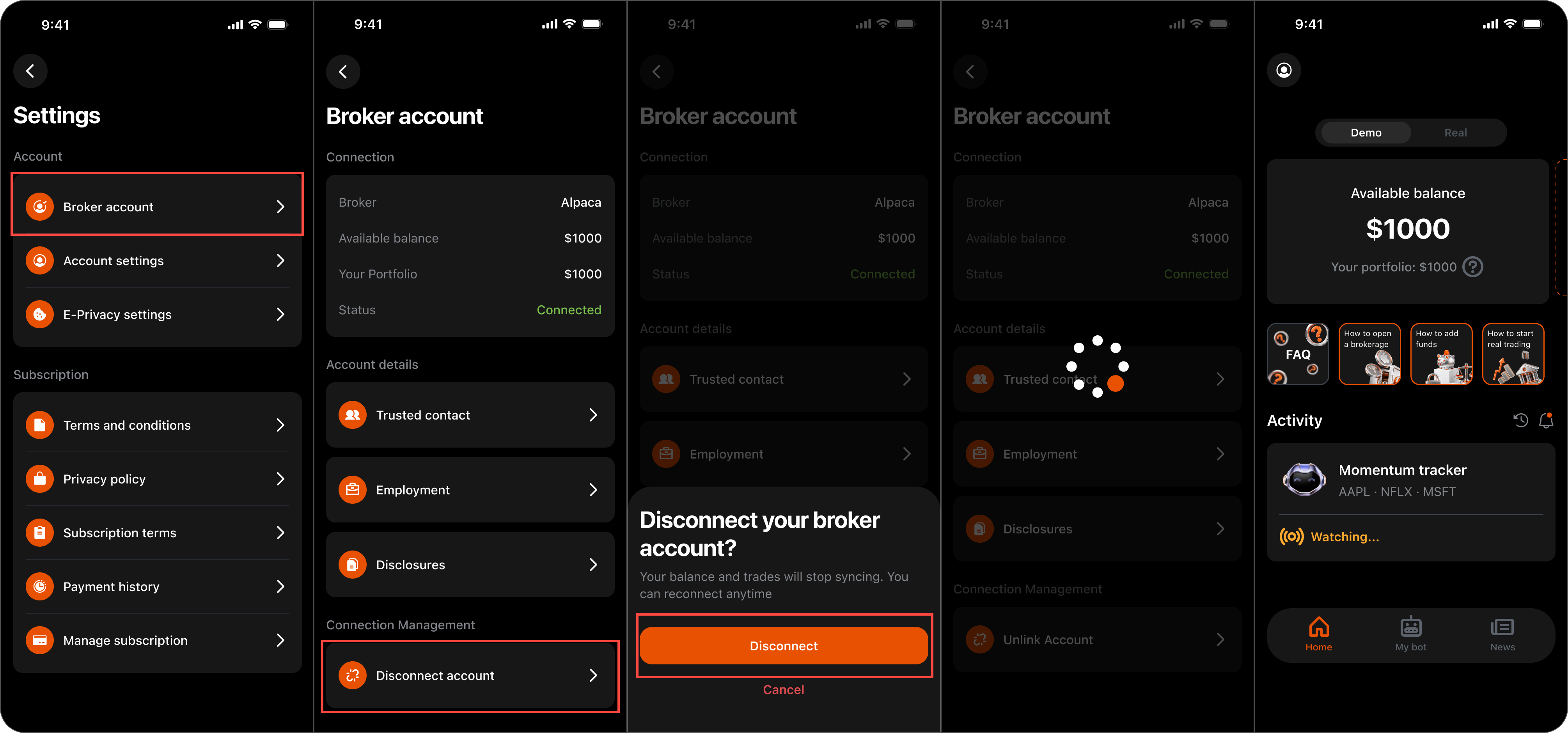
Steps to disconnect your broker account:
- Open the Monflex app on your device.
- Go to your Profile section by tapping the Profile Icon on the Home Page.
- Tap the gear icon at the top of the page to open Settings.
- Select Broker account.
- Scroll down to the Connection Management section and tap Disconnect account.
- Confirm your choice by tapping Disconnect on the pop-up modal.
What happens after disconnecting:
Your brokerage balance, portfolio metrics, and active trades will stop syncing with Monflex immediately. Your funds remain safe inside your personal Alpaca account. You can reconnect your brokerage account at any time whenever you are ready to resume live trading.
If you experience any issues unlinking your account, contact us at support@monflex.io or by submitting a ticket to the Support Center.