You can request the deletion of your Monflex account and personal data directly in the app or by contacting our Support team.
Deleting your account in the app:
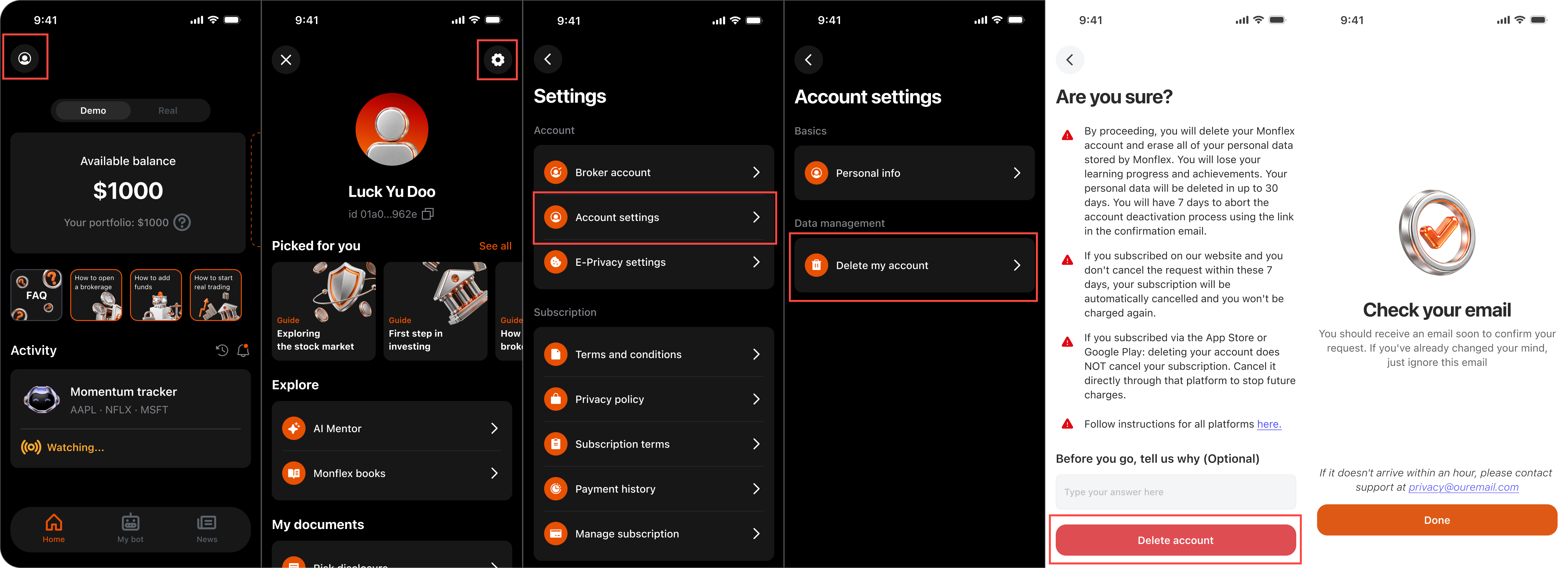
To request account and data deletion from within the app:
- Open the Monflex app and go to Profile -> Settings -> Account Settings -> Delete My Account.
- Confirm your deletion request.
- Check your inbox for a confirmation email and click the "start the deletion" link inside to proceed.
Important confirmation requirement:
Please note that if you do not click the "start the deletion" link inside the email, the deletion process will not be initiated, and your account will remain active.
After confirming your request:
- Your account is scheduled for deletion on the 7th day after your request.
- Your personal data is fully erased from active systems within 30 days.
- Your subscription is automatically canceled, and you will not be billed again.
Deletion request limit:
You can submit a deletion request once every 30 days.
Requesting deletion by email:
Send a request to privacy@monflex.io from the email address linked to your Monflex account (or include that address in the message). We will process the request and confirm once it is complete.
Deleting your account erases all associated data, including your profile, login credentials, bot settings and demo trading history. Some data may be kept for a limited time where the law requires it.
Important note regarding partial deletion:
Please note that we cannot delete partial data (such as removing only credit card details while keeping the account active). Requesting account deletion will erase all associated information across both web and mobile app platforms.
If you experience any issues resetting your password, contact us at support@monflex.io or by submitting a ticket to the Support Center.