You can follow your bank check and deposit progress in Real mode. Tap Details on the Home screen to open Account details.
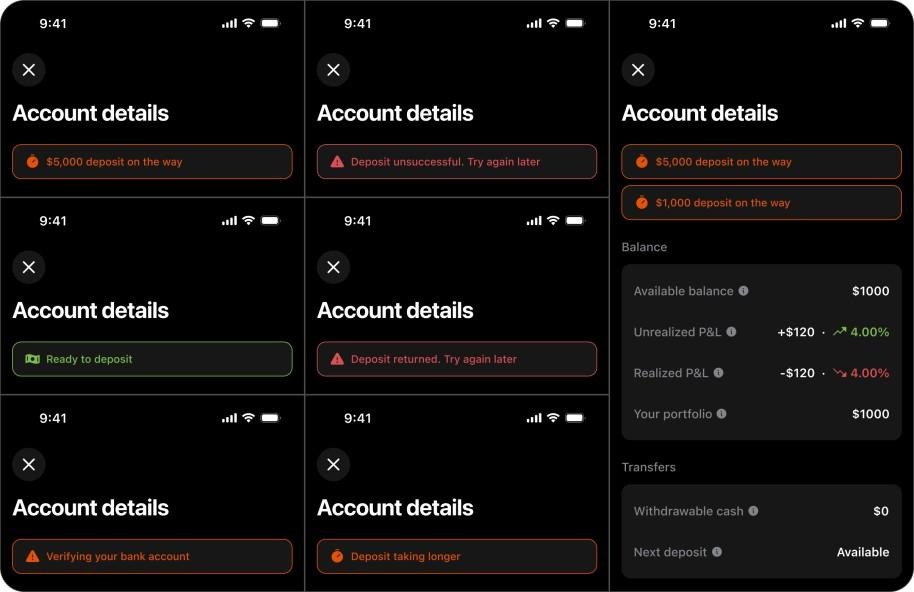
Pending verification ("Verifying your bank account"): Your bank is still being checked. Wait for a notification that it's approved.
Ready to deposit: Your bank is ready. Tap Add funds on Home to deposit.
Processing ("$100 deposit on the way"): Your deposit was sent. It usually arrives in 1 business day.
Completed ("Deposit arrived"): The money is in your account. Tap the notification or Go to Trades to start trading.
Failed ("Deposit unsuccessful" or "Deposit returned"):
Deposit unsuccessful: Your bank didn't have enough money. Tap Try again and enter a smaller amount.
Deposit returned: Your bank returned the transfer. You can try again tomorrow.
Delayed ("Deposit taking longer"): The deposit hasn't arrived after 1 business day. On the 2nd business day you get a notification. No action needed, we'll let you know when it arrives.
If you have any questions, contact us at support@monflex.io or submit a ticket.