The Account details screen shows your balances, profit and loss, and transfer information.
How to open Account details:
Open Monflex and go to the Home tab.
Under your balance card, tap Details (three dots).
Some sections appear only in Real mode, for example deposit status banners and Withdrawable cash.
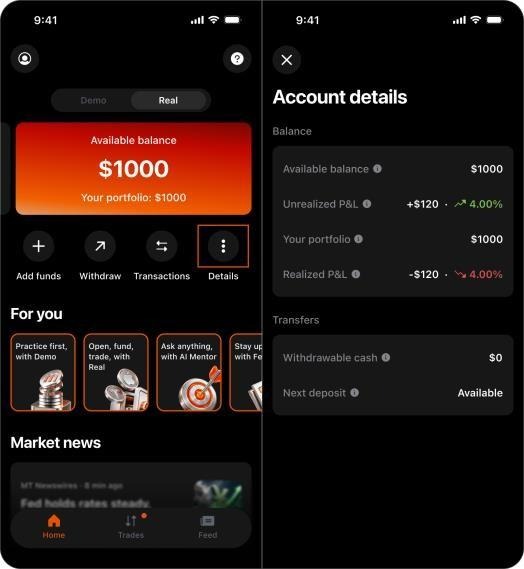
1. Balance section
Available balance: Free money ready for new trades.
Unrealized P&L: Current profit or loss on your open trades.
Your portfolio: Total account value (available money plus open trades).
Realized P&L: Total profit or loss from closed trades.
2. Transfers section
Withdrawable cash (Real mode only): The amount you can withdraw to your bank now.
Next deposit: Shows Available if you can deposit now. If not (for example, because of the 1-deposit-per-day limit), it shows when your next deposit becomes available.
3. Deposit statuses (Real mode only)
If you have a recent bank transfer, a status banner appears at the top of Account details.
If you have any questions, contact us at support@monflex.io or submit a ticket.