You can view, download, share, or end your agreements anytime in your profile.
How to open Agreements and disclosures:
Tap the Profile icon in the top-left corner of the Home screen.
Scroll to Account documents and tap Agreements and disclosures.
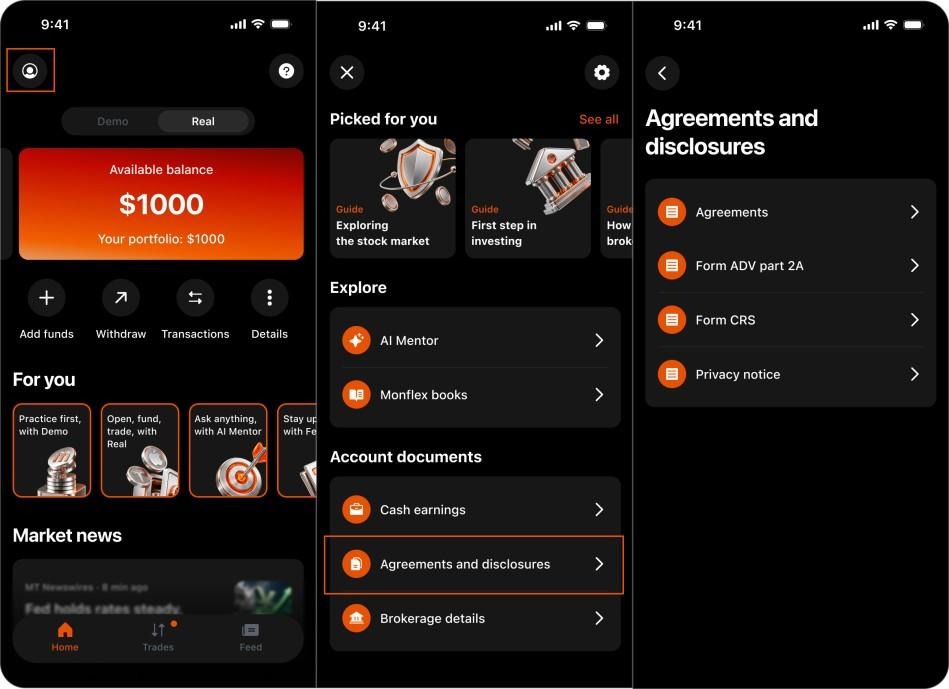
What you'll find inside:
Agreements: your signed Advisory agreement and E-delivery disclosure, with versions and dates. You can read, Download, or Share them.
Form ADV Part 2A: Monflex's brochure about our services and risks.
Form CRS: a short summary of our services, fees, and standards.
Privacy notice: how Monflex collects, protects, and uses your data.
How to end your agreements:
Tap Terminate agreement in Agreements. This ends both your Advisory agreement and E-delivery disclosure and stops new setups. Your open trades are closed:
If the market is open: You see "End your agreements?" with the number of open trades and your estimated P&L. Tap End agreements, and all open trades close right away at the market price.
If the market is closed: Your open trades show "Closes at market open" and close automatically when the market opens. Until then, Trades shows AGREEMENT NEEDED.
How to accept the agreements again:
Open Agreements, tick both boxes, tap Accept agreements, confirm your details, and tap Continue. AI starts sending setups again.
If you have any questions, contact us at support@monflex.io or submit a ticket.