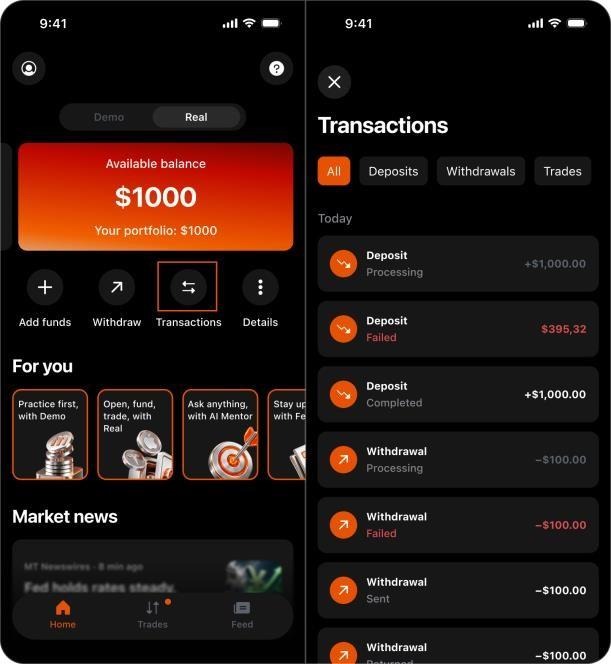
The Transactions screen shows all your deposits, withdrawals, trades, dividends, and fees.
How to open Transactions:
Open Monflex and go to the Home tab.
Under your balance card, tap Transactions (double-arrow icon).
Use the filters at the top (All, Deposits, Withdrawals, Trades).
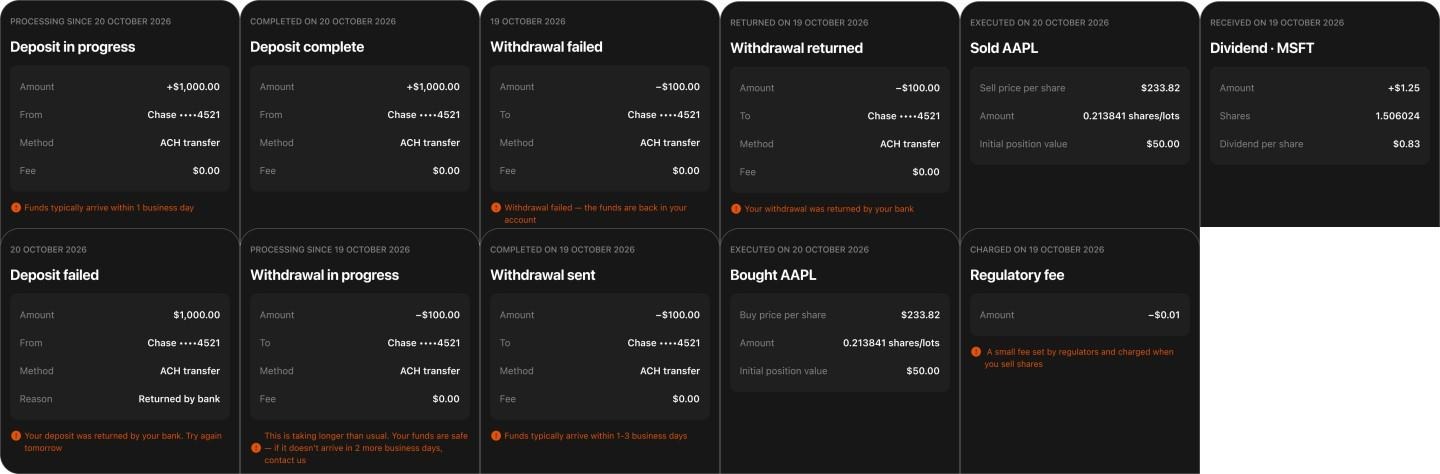
Tap any item to see details such as dates, bank account, fees, or number of shares.
Deposit statuses
Processing: Your transfer was sent. Money usually arrives within 1 business day.
Failed: The deposit didn't go through (for example, your bank returned it). You can try again the next day.
Completed: The money arrived and was added to your available balance.
Withdrawal statuses
Processing: Your withdrawal is in progress. If it takes longer than usual, your money is safe. Contact support if it doesn't arrive within 2 more business days.
Failed: The withdrawal didn't go through, and the money was returned to your balance.
Sent: The money was sent to your bank and usually arrives in 1–3 business days.
Returned: Your bank returned the transfer.
Trades
Bought / Sold (Executed): Shows the price per share, number of shares, and position value.
Regulatory fee (Charged): A small fee set by market regulators, charged automatically when you sell shares.
Dividend (Received): A dividend paid to you, with the amount, number of shares, and dividend per share.
If you have any questions, contact us at support@monflex.io or submit a ticket.