Your official brokerage documents are prepared by Alpaca. When a new document is ready, Monflex sends you an email.
How to open it:
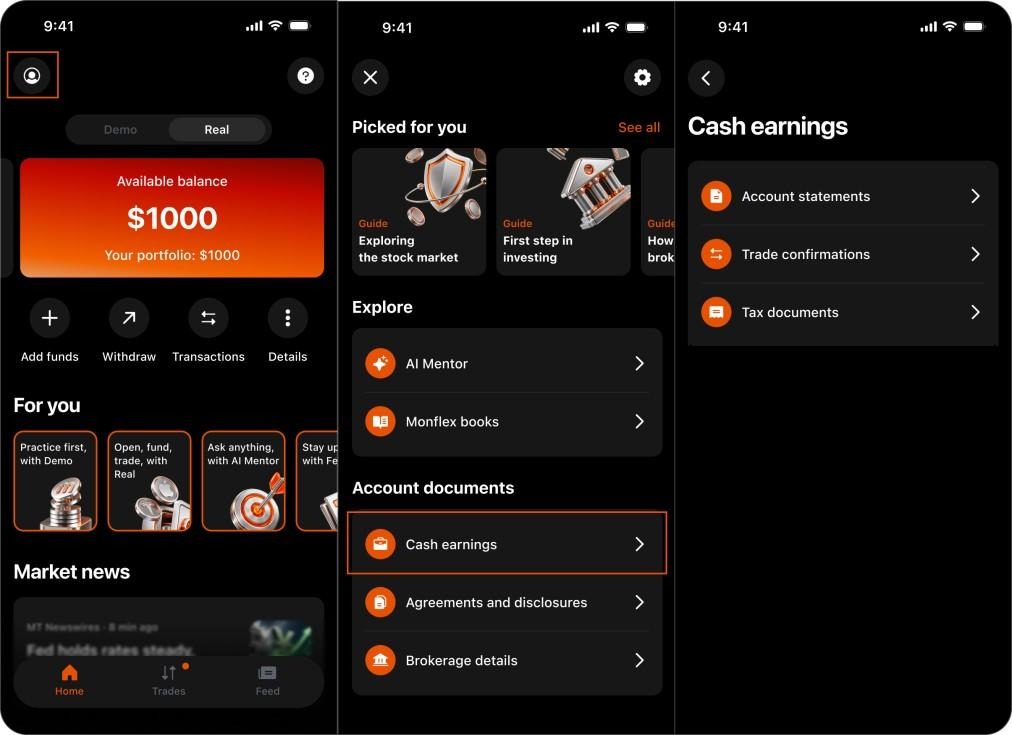
Tap the Profile icon in the top-left corner of the Home screen.
Scroll to Account documents and tap Cash earnings.
Choose Account statements, Trade confirmations, or Tax documents.
Tap any document to open the PDF. Lists go from newest to oldest. If there's nothing yet, you see "Nothing to show yet".
1. Account statements
Monthly summaries of your balances, positions, deposits, withdrawals, trades, dividends, and fees. Available by the 10th of the next month. Use the By year filter at the top.
2. Trade confirmations
Reports of your buys and sells, with shares, prices, dates, and fees. Available the next business day after a trade. Use the By month filter at the top.
3. Tax documents
Yearly tax forms (such as Form 1099) with your dividends, sale proceeds, and withheld taxes. Issued once a year during tax season, only for years with taxable activity.
If you have any questions, contact us at support@monflex.io or submit a ticket.