You can close your brokerage account inside Monflex (no more than once every 30 days). This is separate from deleting your Monflex account. It only closes the brokerage account: your Monflex profile and subscription stay active, so you can keep using Demo or open a new brokerage account later.
How to start:
Tap the Profile icon in the top-left corner of the Home screen.
Scroll to Account documents and tap Brokerage details.
Under Connection management, tap Close brokerage account.
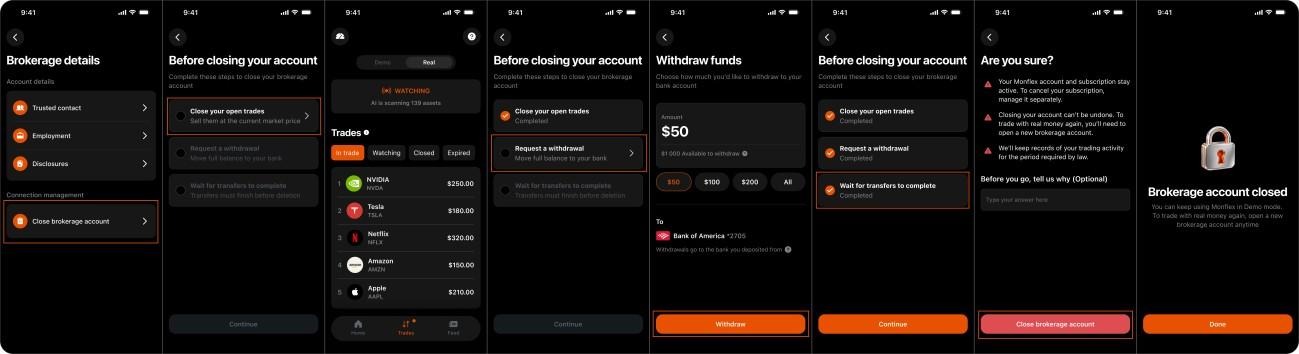
Complete the checklist ("Before closing your account"):
To close the account, you need no open trades, a $0.00 balance, and no transfers in progress. Finished steps show Completed.
Close your open trades: Tap this step to go to Trades and close your trades. Manual closing works during U.S. market hours (9:30 AM–4:00 PM ET).
Withdraw your money: Withdraw your full balance to your bank. After closing trades, the money usually takes 1 business day to settle. The checklist shows when it's available.
Wait for transfers to finish: All deposits and withdrawals must be completed.
Final confirmation:
When all steps show Completed, tap Continue.
Read the "Are you sure?" notes: your Monflex subscription stays active, closing can't be undone, and trading records are kept as required by law.
Optionally share your reason, then tap Close brokerage account.
You see "Brokerage account closed". Tap Done to return to Demo mode.
If you have any questions, contact us at support@monflex.io or submit a ticket.