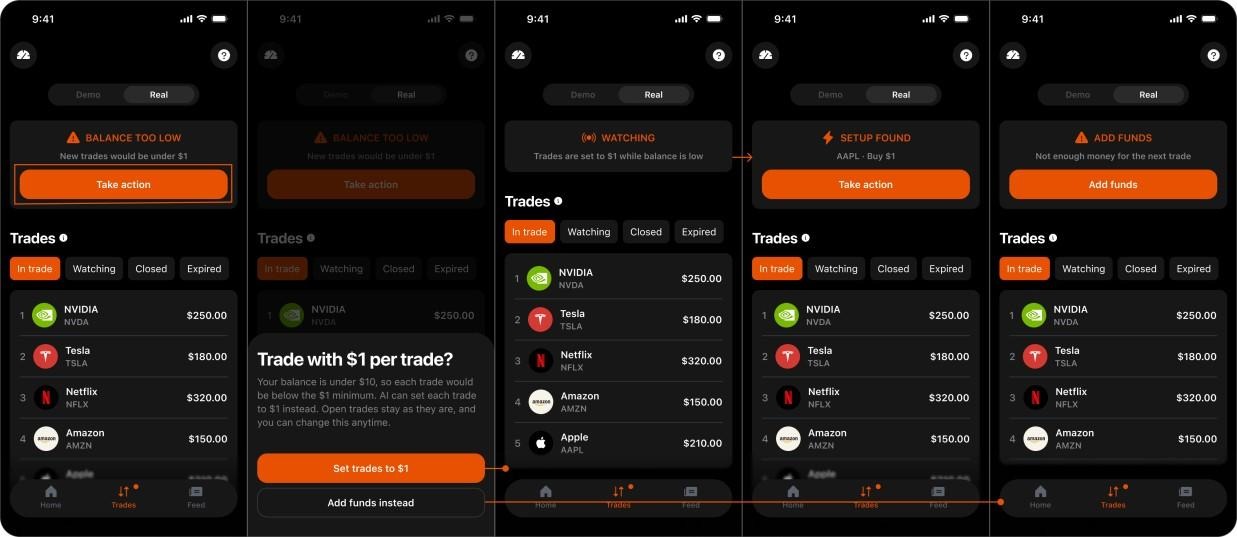
By default, each trade uses 10% of your available balance. If that amount would be less than $1, AI pauses new setups and shows the BALANCE TOO LOW banner ("New trades would be under $1"). This usually happens when your balance drops under $10.
You can fix this from the Trades banner or with the Personalized position size switch in your Trading profile (under Settings).
1. How to fix "BALANCE TOO LOW" from the Trades tab
On the BALANCE TOO LOW banner, tap Take action.
In the "Trade with $1 per trade?" window, choose one option:
Set trades to $1: AI suggests all new setups at $1 each while your balance is low. Open trades don't change. Your choice is saved until your balance grows again or you turn this off in your Trading profile.
Add funds instead: Opens Add funds, where you can connect your bank (if needed) or enter an amount. Until you add money, the banner shows ADD FUNDS ("Not enough money for the next trade").
2. Turning "Personalized position size" OFF
Balance under $10: Tap the switch in Trading profile → Settings and choose Set trades to $1. Your trade size changes from 10% to $1 until your balance grows or you turn the switch back on.
Balance $10 or more: You can't turn it off. You'll see "Can't change trade size yet", and AI keeps using 10% per trade.
3. Turning "Personalized position size" ON
Balance still under $10: The switch turns on, and a window reminds you that AI can't open new trades until you add funds (or set trades to $1 again).
Balance $10 or more: The switch turns on right away, and your trade size goes back to 10%.
If you have any questions, contact us at support@monflex.io or submit a ticket.