If your finances, savings, or goals change, you can retake the questionnaire. Monflex recalculates your risk level and AI limits.
How to retake the questionnaire:
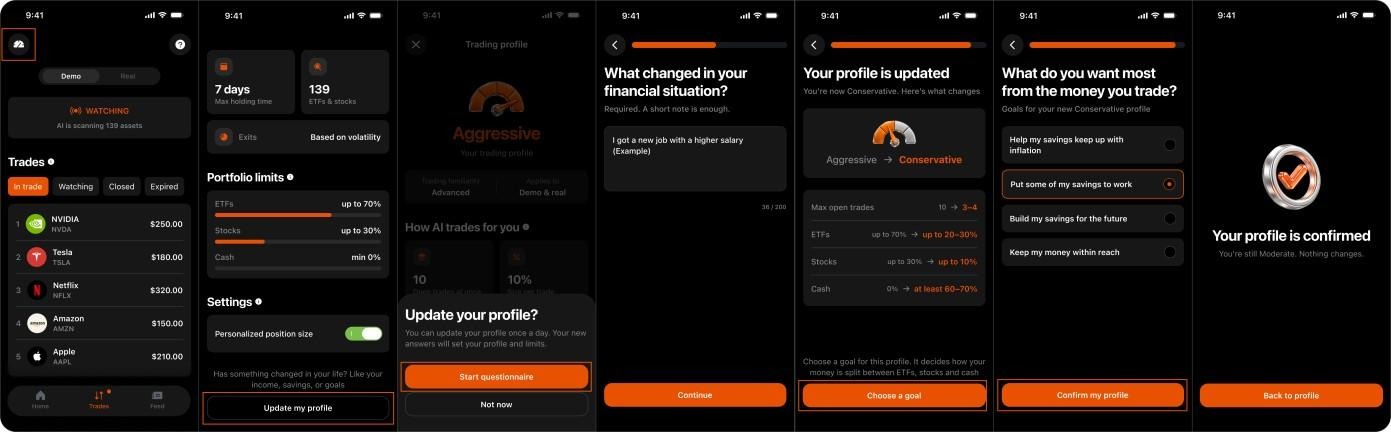
Open Trades and tap the Trading profile icon in the top-left corner.
Scroll down and tap Update my profile.
In the "Update your profile?" window, tap Start questionnaire.
Answer the questions about your finances, experience, comfort with risk, and goals.
You can update your profile once a day.
New limits apply only to new trades. Your open trades keep their original settings.
What happens when you finish:
Same profile: If your risk level didn't change, you see "Your profile stays …". Tap Confirm my profile to keep your settings.
New profile: If your risk level changed, you see "Your profile is updated" and how your limits change. Tap Choose a goal, select your goal, and tap Confirm my profile.
If your new profile has lower limits than your current open trades, AI pauses new setups until those trades close and your portfolio fits the new limits.
If you have any questions, contact us at support@monflex.io or submit a ticket.